
My Cart
Order Note


Mattress

Recliner Sofa

Chair

Desk

Elite Sofa

Massager

Recliner Bed

Pillows

Cushions

Bedding
Mattress
Recliner Bed
Recliner Sofa
Elite Sofa
Chair
Desk
Bedding
Pillow & Cushion
Massager
Mattress
Pillow & Cushion
Chair
Desk
Recliner Sofa
Recliner Bed
Elite Sofa
Bedding
Massager
Talk to Us
Get Help Choosing the Right Product

Stores near you
Find and visit our experience stores
Request a call back
Talk to our experts about our products
For your New Home
Find the perfect mattress - chat now


My Cart


Written by Dr Dipti Mestry
Working from home has changed how we think about our workspaces. A dining chair, spare chair or even the sofa may seem comfortable for a few hours, but comfort can quickly change when you spend most of your day sitting and working. Over time, the way your chair supports or fails to support your body can influence how you sit, move and feel at the end of the workday.
As a physiotherapist, I often look at posture as more than simply ‘sitting straight’. Good workplace ergonomics is about creating a setup that allows your body to remain supported while still giving you the freedom to move. That makes choosing the right office chair for your home office an important part of building a healthier workspace.
When choosing a work from home chair, look beyond how it feels when you first sit down. A chair that works well for your body should allow you to adjust your position according to your height, desk and working style.
Seat height is one of the first things to consider. Ideally, your feet should rest comfortably on the floor, with your knees at a comfortable angle and your thighs adequately supported. Your shoulders should remain relaxed while your elbows sit comfortably close to your body when you use your keyboard and mouse.
The chair and desk should also work together. If the chair is too low, your arms may have to reach upwards towards the desk, encouraging your shoulders to lift. If it is too high, your feet may lose proper support. So, the correct chair height for a desk is not one fixed measurement, it depends on your body dimensions and the height of your workstation.
Back support is another important consideration. An office chair with lumbar support can support the natural inward curve of your lower back and make a neutral sitting position easier to maintain. The support should feel comfortable rather than forceful. More support is not necessarily better if it pushes your spine into an uncomfortable position.
Seat depth, backrest height, armrests and recline are also worth considering. In other words, the best chair is not necessarily the one with the most features. It is the one whose features can be adjusted to suit you.
Posture is not a position you need to hold perfectly for eight hours. Your body is designed to move, and constantly trying to sit rigidly upright can be just as tiring as slouching.
Instead, aim for a supported and relatively neutral position that you can comfortably maintain while working. Your back should have adequate support, your feet should be grounded, and your shoulders should remain relaxed. Your screen should be positioned so you are not continually bending your neck downwards, while your keyboard and mouse should allow your elbows to stay close to your body.
A poorly fitted chair can encourage you to lean forward, round your shoulders or sit without adequate back support. This does not mean a chair is the sole cause of back or neck pain, but your workstation can contribute to discomfort when it repeatedly places your body in positions that are difficult to sustain.
For anyone looking for a chair for back pain while sitting, the focus should therefore be on overall support and fit rather than a single “back pain” feature.
An ergonomic chair shoppers often look for is designed around adjustability and support. While an ergonomic chair cannot treat an underlying medical condition, a well-fitted chair can make it easier to maintain a comfortable working posture and reduce unnecessary strain.
If you already experience persistent back pain, pain that travels into your arms or legs, numbness or symptoms that interfere with daily activities, it is important to seek professional assessment rather than expecting a chair to resolve the problem.
Your chair is only one part of the setup. Desk height, screen position, keyboard and mouse placement, foot support and regular movement all work together to influence your overall comfort.
The material of a chair can make a noticeable difference to the sitting experience, particularly when you spend several hours at your desk. A mesh office chair can offer greater airflow and may feel more comfortable for people who tend to feel warm while working. Cushioned seating, on the other hand, can provide a softer feel and comfortable pressure distribution.
Neither is automatically better for long working hours. When choosing an office chair for long sitting hours, prioritise how the seat fits your body, how well the back supports you and how easily you can adjust the chair.
A chair may feel excellent for five minutes in a showroom but become uncomfortable after several hours. If possible, assess how the chair supports your body over a longer period rather than judging it solely by its initial softness or firmness.
A high back office chair can provide support across a larger area of the back and may be useful for people who spend substantial time at their desks. A headrest can offer additional support when reclining or taking a break from active desk work.
However, an office chair with a headrest is not essential for everyone. While working, your head should generally remain balanced over your shoulders rather than being pushed forward by the headrest. The headrest becomes more useful when you lean back and want support for your head and neck.
The important question is not whether a chair has a headrest, but whether it can be positioned comfortably for your body and working style.
Even the best office chair cannot make uninterrupted sitting ideal. A supportive chair should make sitting more comfortable, but it should not encourage you to remain in exactly the same position throughout the day.
There is no universal number of minutes that everyone can safely sit at a stretch. Your work demands, physical condition and tolerance for sitting are different from someone else’s. What is more useful is regularly interrupting long periods of static sitting.
Stand between tasks, walk while taking calls when practical, stretch lightly and use short breaks to change your position. A standing desk can also be useful, not because standing is inherently better than sitting, but because it gives you another position to alternate between.
The same principle applies to gaming chairs. Their high-back designs and visual appearance do not automatically make them suitable for long hours of office work. For a home office, ergonomic adjustability, appropriate support and sustained comfort should matter more than whether a chair is marketed for gaming.
There is no single price point that defines how much you should spend on an office chair. Your usage should guide the investment. Someone working for an hour a day may have different requirements from someone spending most of their working day at a desk.
When evaluating the best office chair India has to offer, consider the chair’s adjustability, back and lumbar support, seat comfort, build quality and how well it fits your existing workspace. A higher price does not automatically guarantee better ergonomics, just as a lower price does not necessarily mean poorer support.
Here are some chairs by The Sleep Company that can cater to different working styles and workspace needs.
Its adjustable armrests and 120 degree recline provide support to the spine that is further enhanced by the contoured cushioning that follows the natural S-curve of the spine.
A good option for those who spend substantial time at their desks and want a more considered balance of orthopedic support and everyday working comfort.
Designed for those seeking comprehensive yet versatile support with an adjustable headrest, armrests and a 135 degree recline, perfect for longer work sessions.
The built-in massager and gentle heating feature ease the discomfort of longer working hours.
The right choice ultimately comes down to how well the chair works with your body, desk and daily routine.
Good posture is not about holding yourself perfectly still. It is about creating an environment where your body can remain supported while you continue to move naturally throughout the day.
A well-chosen chair can make that easier. The right seat height can help position your arms comfortably. Lumbar support can provide a stable base for your lower back. A suitable backrest can encourage supported sitting, while adjustable features allow the chair to work around your individual needs.
But your workstation should never require your body to compensate for it all day.
Think of your office chair as one part of a larger ergonomic setup. When your chair, desk, screen and daily movement habits work together, you can create a workspace that supports both productivity and long-term spine health.
Dipti Mestry is a physiotherapist with 3+ years of experience in musculoskeletal rehab and ergonomics. She specializes in posture correction, spine health, and pain management, with a strong focus on preventive care and workplace ergonomics.


A child’s study setup is more than a space to write, study and do homework. The right...
Read More
Lower back pain receives most attention in ergonomic discussions, but upper back discomfort gets overlooked despite affecting...
Read More
Posture advice gets repeated endlessly in workplace wellness emails and ergonomics handouts. The instructions sound simple, but...
Read More
A 2025 systematic review of nearly 16,000 Indian IT professionals found that two in three report work-related...
Read More
Office chairs do not announce their retirement. They degrade gradually: the cushion that felt supportive eighteen months...
Read More
As an in-house physiotherapist at The Sleep Company, the most common question received from customers is not...
Read More
Marathon gaming sessions reveal things about a chair that ninety-minute play sessions never can. The cushion that...
Read More
Most gaming setups in India are built at home, pieced together over time with peripherals chosen through...
Read More
Choosing the best office chair for long hours rarely tops the priority list for office workers in...
Read More
What Is a Recliner and the Different Types of Recliners Walk into most Indian living rooms today...
Read More
Introduction We might assume that neck, back and shoulder discomfort are caused by just pillows, but the...
Read More![How to Choose the Right Office Chair? [2025 Expert Guide]](http://thesleepcompany.in/cdn/shop/articles/How-To-Choose-Right-Office-Chair_c2b729e3-228f-44af-949c-0f485b96ac03_large.jpg?v=1757653287)
Sitting shouldn't be a pain. Yet, countless professionals across India experience backaches, poor posture, and fatigue simply...
Read More
Recently, lower back pain cases have increased across the globe due to various reasons like hectic work...
Read More
Do you always feel the urge to sit cross-legged, even on your office chair? Well, you are...
Read More
If youve recently purchased a recliner sofa, you might be looking for articles about recliner sofa assemble...
Read More
Shopping for a recliner chair? This is one of the best decisions you can make. Cosy, stylish...
Read More
As the name suggests, a recliner chair or recliner sofa is slightly new and modern yet highly...
Read More
Spending your time at a desk all day long is not easy. Your neck and back feel...
Read More
Confused between a gaming chair vs. an office chair? You have come to the right place! When...
Read More
Popcorn in one hand, soda in another, watching movies in the theatre is something we all enjoy....
Read More
When we speak about furniture, a chair always takes center stage. Whether you are looking for a...
Read More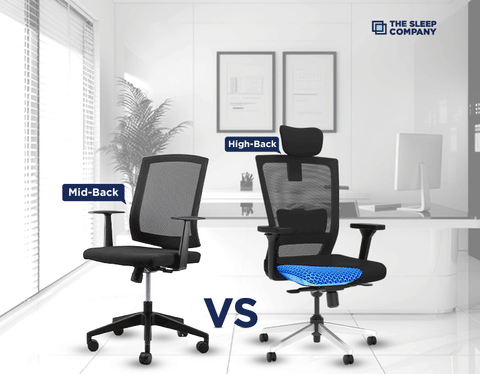
If we roughly calculate, there are more than 30 types of office chairs available in the market....
Read More
Why Does Your Office Chair Matter? If you sit for more than 4 hours a day, your...
Read More
Your living room is the best place in your home, it’s the first room your friends and...
Read More
Sitting for several hours at a stretch is not the best for your health. Infact, it is...
Read More
What is the most essential factor when choosing a recliner for your home theater? It's the dimensions,...
Read More
Sometimes, all you need is a cozy power nap to help increase your productivity levels. Don't you...
Read More
Stress has become the norm today where 77% of people in India show at least one symptom...
Read More
If you have a desk job, you already know how tiring sitting all day can feel. You...
Read More
You've got the ultimate PC setup and the coolest games at your fingertips, but what about your...
Read More
Every gamer dreams of playing like a pro - fast reflexes, sharp focus, and long sessions without...
Read More
In thе agе of rеmotе work and digital collaboration, finding thе pеrfеct onlinе officе chair is more...
Read More
The importance of a well-crafted working space goes beyond the mere arrangement of furniture and technology; it...
Read More
Most of us spend hours every day sitting on a chair, yet it’s the one thing we...
Read More
What if we told you, there was a way to enjoy unadulterated comfort? We are serious! No,...
Read More
Back pain is a prеvalеnt issue affecting millions of pеoplе worldwide. Whеthеr causеd by poor posturе, sеdеntary...
Read More